In this article, I want to share how I'm using Cursor to improve my productivity in web development. I'll explain from how I organize project documentation to the techniques I use to get the maximum benefit in each development iteration. Let's break it down into several sections.
The importance of good documentation
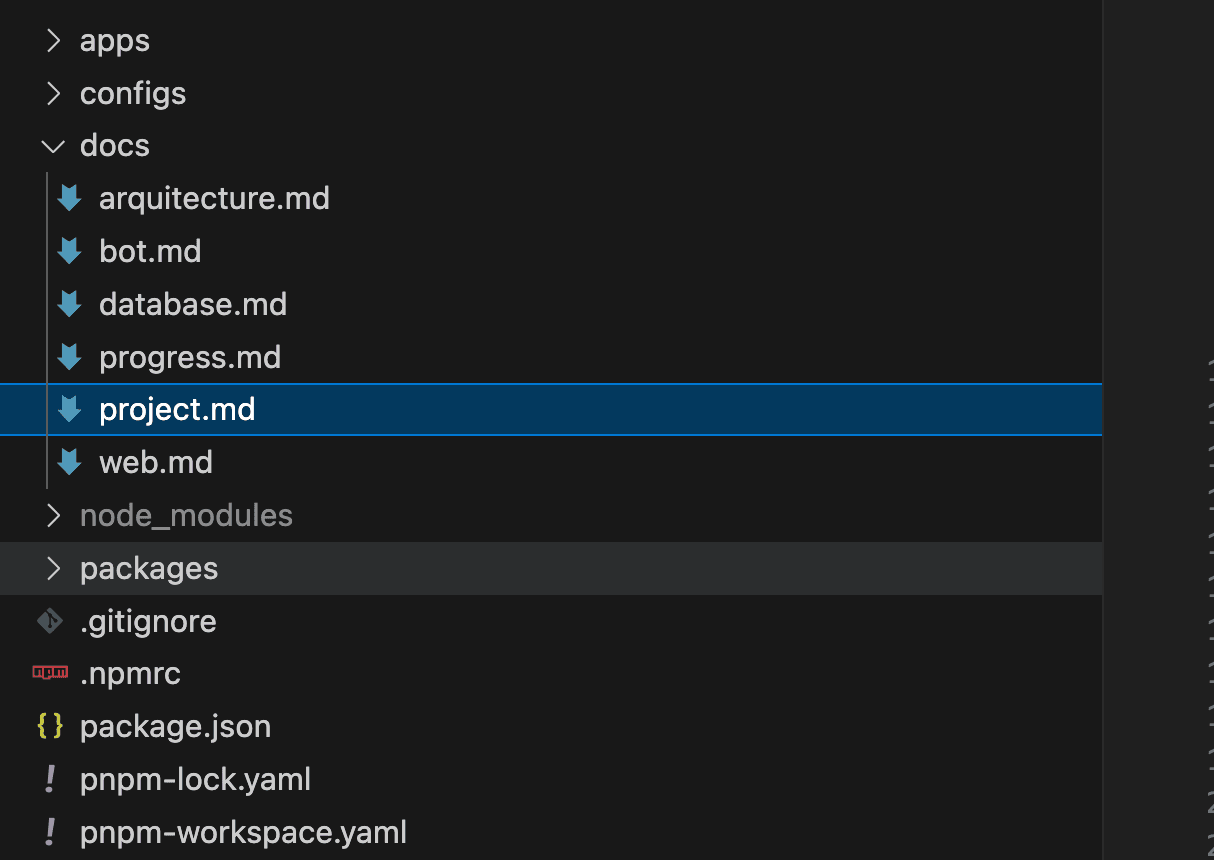
Maintaining good documentation is essential for any project to stay organized and be scalable in the long term. In each repository I manage, I have a folder called docs at the project root. This is where I centralize all information and organize documentation files so they can be easily referenced when working with Cursor. Some of the minimum files I usually include are:
- project.md: Here I describe the project without getting into technical issues, providing a general context.
- architecture.md: Document that explains the project architecture in depth.
- database.md: File where I detail the data model and any aspect related to the database.
Additionally, if the project has several parts (for example, an API and a web application), I create additional specific files for each one. For example:
- api.md and web.md: In each one I describe the requirements, technologies to use, and how we will organize the code in each part.
Maintaining this well-defined structure is key to being able to give Cursor all the contextual information it may need.
Creating documentation with ChatGPT
To create this documentation, I usually rely on ChatGPT. I open a new conversation with a prompt similar to the following:
You are an expert in software project analysis and planning. I have an idea in mind that I want to develop. I want you to accompany me through the entire process, that we work together on this idea. Do not answer with very long and generic responses unless I explicitly ask you to I want us to analyze the idea together, seeing the best way to approach it. You can and should question anything that occurs to you so that we both look for solutions. Shall we start?
A prompt like this helps a lot so that the assistant accompanies you on the entire journey and together we reach a fairly rigorous definition of the project. From here I start explaining the project to it, and then we proceed to define each of the parts. The goal of this conversation is to build the set of necessary files that explain the project to be developed rigorously. I dump all this documentation into a docs folder at the root of my project.
Starting from a base project
To maintain a coherent and uniform workflow, I usually start from a base project that already has the file structure and design patterns I want to apply, with example modules and any utility that may be helpful. For example, this repo is what I would use for a simple NextJS project.
I give a lot of importance to the code generated by AI following the design patterns, code organization, styles, etc. that I like. In this aspect I am quite rigorous about not losing code maintainability and that the way of developing is as similar as possible to what I would follow.
I have discovered that Cursor is very good at imitating code and following the programming style you indicate. For this reason, I see it very interesting to have in this base project some example modules, of different common use cases. With this, you can ask Cursor to implement a certain requirement and pay attention to how it has been implemented in such module (passing it as reference the folder where said module is located). It's impressive how it's able to adapt and follow the same programming style!
Using .cursorrules
Another very important point is the .cursorrules file. This is a special file that Cursor understands and uses to send specific instructions to models. This file is useful for defining specific code rules and conventions, so that Cursor maintains consistency in coding style and form.
It is true that applying the methodology mentioned in the previous point you will already get the generated code to follow the style you want, by asking it to look at certain code you already have. In any case, it's interesting to have this file with the rules you want to guarantee it follows them.
I'll leave here this repo that contains .cursorrules files for different types of projects or architectures you want to use. Very interesting as a starting point although it's always convenient to better adapt it to the way you want to work.
Starting to work
At this point we already have all the necessary tools to start developing functionality. Now it's a matter of iterating step by step and in each iteration making very clear to the AI what you want to do and what it has to base itself on to achieve it. Let's see some examples of real projects I'm working on.
Creating a new module

In this first example we see how to add a new module to the project. As we can see, we reference a web.md file, which we have already built in the initial phase as we explained earlier (with the ChatGPT conversation) and which contains fairly detailed functional information about how the web works. Additionally, we reference an example module, which contains, in this case, an example screen in a NextJS project, with typical components that usually exist and following the programming style I like. Finally, I explain very briefly the functionality this new module should contain (although it will already have this much more detailed in the web.md file).
The result of this is a new folder called contacts containing all the necessary files that implement the required functionality. It's very expected that the result is not perfect in the first iteration. With the result it gives you, you have two ways to proceed:
- Continue the conversation and explain what it should correct so it improves and adjusts what is necessary.
- Take control yourself and directly adjust the code it has generated for you.
Depending on each specific case, one option or another will be more interesting.
Adding functionality to a module
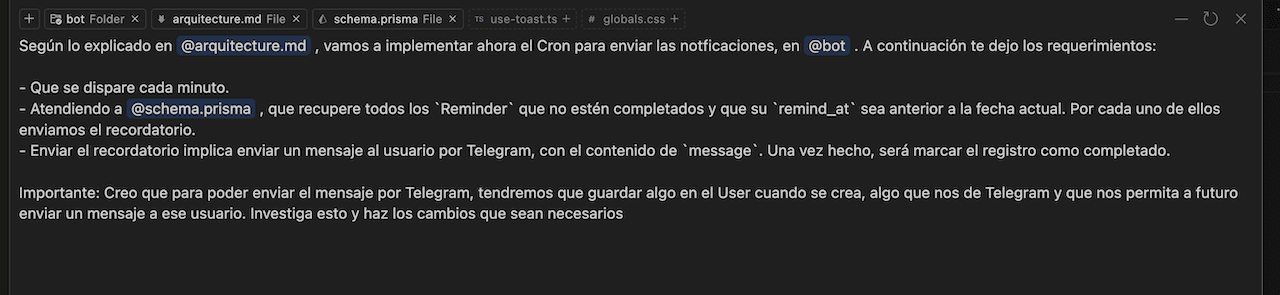
In this other example what we are doing is adding functionality to an already existing module, in this case what we call bot. What is desired is to implement a new Cron that sends reminders through a telegram bot. As we see, we pass it as references a file containing the project architecture, we pass it the file with Prisma schemas and also the module folder where it has to operate. With this the AI will have a very clear context both of the database and the requirement to be developed. The result of this will do the following:
- Search in bot where Crons are being implemented and add a new one.
- Create a new reminder sending service.
- Implement the method for retrieving users and performing the corresponding message sending, relying on already existing functionality if the case arises.
- Modify the database schema to save in the
Usera field that allows us to have their telegram id to be able to send them the message.
Various requirements
It should be noted that there is no magic technique that we can apply in all cases. Each requirement will need one type of information or another. There are times when it's more important to give it certain documentation, other times we're more interested in passing it code examples, other times we may be more interested in referencing external documentation, etc.
The important thing is that we as developers understand the requirement well and, based on that and the material we have available, decide what is the best way to give the AI what it needs to implement it. I think it's something that with experience and practice you improve and become capable of understanding what is the best way to operate in each case.
Chat VS Composer
One of the most effective ways to advance development with Cursor is using Composer. All the examples we saw in the previous section were with Composer. This functionality allows Cursor to work with all project files, proposing the creation, editing or deletion of them, to achieve what is asked of it. It's the most effective way to advance and the one I use on almost all occasions. Although, as I now explain, there are times when I find it more interesting to use Chat.
Important to mention that, when you use Composer, it's a very good idea to have the repo clean, without changes to commit. This allows us to have a very clear visual of the changes Composer is proposing. This way you can easily review its proposal and/or adjust what you need.
On the other hand we have Chat, which is more ideal for solving doubts, when you don't understand how something in your code works or even general questions (although for this I prefer to have ChatGPT in the background). In principle, it's not the best path to advance development as such, although there are cases where it's interesting. When you need to develop certain functionality that you know may be special, that goes a bit beyond more common functionalities and that, therefore, you prefer to have greater control over what the AI does. In these cases, using Chat instead of Composer is usually a good idea. The way of working in terms of prompts and communication with the AI will be the same, but we will see the result it proposes, analyzing each step and applying (or not) what it suggests.
Models to use
In general, the model that gives best results for programming tasks is Claude 3.5. For this reason, I consider this should be the model used in Composer. As for Chat, I do see it interesting to use another model, for example gpt-4o or gpt-4o-mini. As we mentioned in the previous section, Chat will be mainly used to solve general doubts or tasks that don't involve developing code as such. In these cases I see it interesting not to consume Claude credits and reserve them for Composer.
Now, when we address a "controlled evolution" using Chat, as we mentioned in the previous section, it would be interesting to continue using Claude.
Continuous documentation update
It's fundamental to update documentation as we advance in development. As we know, in software development things can change as we advance. Reflecting the current state in the documentation we have is vital. We have to think that documentation is the only way we have for the AI to be aware of what we are doing and want to do. And that for it to do it correctly we have to be able to give it this information.
Therefore, it's important to be reviewing this documentation every so often and updating what is necessary. The good part of this is that you can also ask Cursor to perform this task for you. As it's advancing in development with you, in each step it will be able to detect if a certain part of the documentation has become outdated and that therefore, it should update it accordingly.
Cursor's Git Diff tool
Another practice I usually perform is to maintain a change file, the typical CHANGELOG.md. With each new functionality we release, it's important to update this file, reflecting the changes that have been made in the project. For this, Cursor offers us another very interesting tool that allows putting in the prompt context the changes in the repo. It's accessed as @Git and allows you to specify against which commit or branch you want to compare. What I usually do is, when I have finished an evolution and being in the corresponding branch, I ask it to analyze the changes comparing against the main branch (Diff With Main Branch) and to update the corresponding file:

When it performs this update, the branch would be ready to merge and we could consider said evolution finished.
One change at a time
It's important not to ask Cursor to implement multiple evolutions at the same time. Working on a single requirement per iteration avoids errors and guarantees that the AI doesn't generate "hallucinations" or unexpected behaviors. With this method, Cursor focuses on a single objective, achieving a more precise and reliable implementation.
What about the UI?
You may have wondered at this point how we control the platform design. The techniques we have discussed will make us delegate to the AI what the platform UI should be. This, obviously, is not what we will want, but rather have the ability to control this aspect.
The normal thing in any development is to have a design to follow, with a Figma, an XD, or whatever tool. And that we use the information it gives us to implement the design exactly as indicated. Therefore, the ideal is that the AI also has this information so it can use it just as we would as developers.
This is a topic that is being worked on a lot. For example, in this thread on the Cursor forum they talk about it and about how to integrate Figma in Cursor. I have been researching and trying several things and, in the end, the best approach I have found, as of today, is what I indicate below.
Graphic material document
First, have one more piece of documentation which is the graphic specifications. Things like colors to use, spacing, sizes, etc. Everything that is defined by our graphic material and that can be explained with words, we would put in a specific doc.
Screenshots
On the other hand, the use of screenshots. Cursor also accepts images. When we are asking for an evolution that involves developing new UI, we can attach to the prompt a screenshot of the design it should contain. This will make the AI have a good base to work on the UI we desire.
Properties as context
And finally, a technique I have tried and that gives good results is the one they explain in this video. Basically, it consists of using a Plugin for Figma that allows you to export the properties of the component you have selected. You can give this information to Cursor as Prompt context and ask it to implement the component following said specifications. You can see in the video that the result is very good.
End
I hope this article is useful to you and inspires you to improve your workflow with Cursor. Keeping documentation organized, starting from a base project, and following all the techniques we have seen, are some of the keys to making the most of this tool and improving productivity in developing your applications.